BubbleAnnotate
A native macOS app for adding speech bubbles and arrows to videos — perfect for demos, tutorials, and candidate presentations.
Speed up your recruitment workflow
URLCV automates CV parsing, candidate scoring, and shortlist generation — so you can place more candidates, faster.
BubbleAnnotate for macOS
Add speech bubbles and arrows to any video. Free and open source.
Download for macOS
Requires macOS 14.0 (Sonoma) or later. Works on Apple Silicon and Intel Macs.
First launch: macOS security note
BubbleAnnotate is free, open-source software. Since it isn't signed with a paid Apple Developer ID, macOS shows a security warning on first launch. This is normal — follow the steps for your macOS version:
macOS Sequoia (15.0+)
- Double-click the app — macOS will show "BubbleAnnotate Not Opened". Click Done
- Open System Settings → Privacy & Security
- Scroll to the Security section — you'll see "BubbleAnnotate was blocked"
- Click Open Anyway and enter your password
macOS Sonoma (14.0)
- Right-click (or Control-click)
BubbleAnnotate.appin Finder - Select Open from the context menu
- Click Open in the dialog that appears
You only need to do this once. The app is safe — you can review the source code on GitHub.
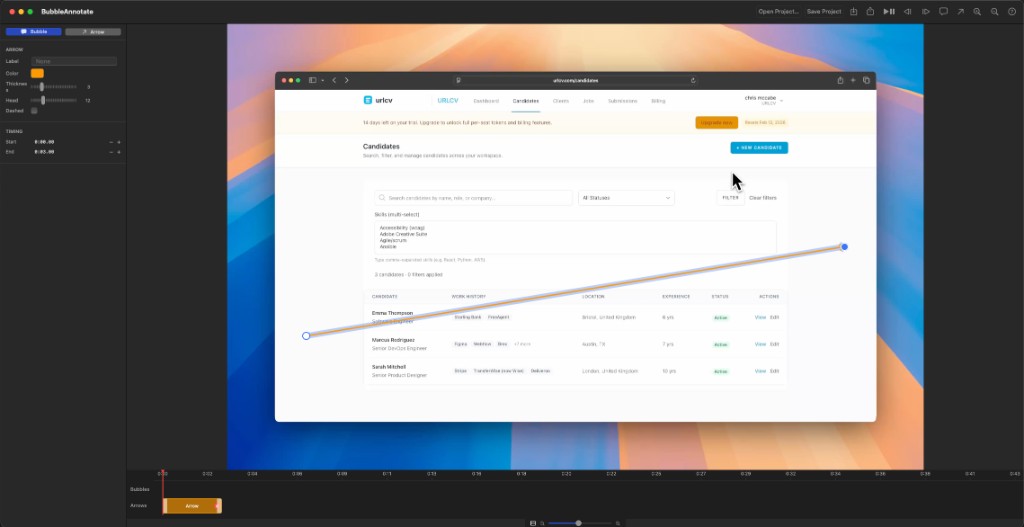
Speech Bubbles
Add text bubbles with customisable fonts, colours, borders, corner radius, and opacity.
Directional Arrows
Point to anything in the video with adjustable arrows — thickness, colour, dash style, and arrowhead size.
Timeline Editor
Drag, resize, and position annotations precisely on a visual timeline with zoom controls.
Video Export
Render your annotated video with all overlays baked in — ready to share or upload.
Project Files
Save and reopen projects to continue editing later. Your work is never lost.
Keyboard Shortcuts
Full keyboard shortcut support for fast, efficient workflows.
Keyboard Shortcuts
BubbleAnnotate
BubbleAnnotate is a free, native macOS desktop application for adding speech bubbles and directional arrows to videos.
Key Features
- Speech Bubbles — Add text bubbles with customisable fonts, colours, borders, corner radius, and opacity
- Arrows — Add directional arrows with adjustable thickness, colour, dash style, and arrowhead size
- Timeline Editor — Drag, resize, and position annotations on a visual timeline
- Drag & Resize — Move and resize all annotations directly on the video overlay
- Export — Render annotated videos with all overlays baked in
- Project Files — Save and reopen projects to continue editing later
- Keyboard Shortcuts — Full keyboard shortcut support for fast workflows
Use Cases for Recruiters
- Annotate candidate video introductions with key talking points
- Highlight skills or experience in demo videos before sending to clients
- Create quick video walkthroughs of CVs or portfolios
- Add context arrows pointing to specific parts of screen recordings
Requirements
- macOS 14.0 (Sonoma) or later
- Apple Silicon or Intel Mac